Microsoft Office Live Install Guide
Statcounter provides customisable hit counters, visitor tracking, web analytics and website stats for Microsoft Office Live.

- Sign up for an account at Statcounter to get your code.
- Copy the StatCounter code
- Log into your Microsoft Office Live website and click "Design Your Site"

- Click the "Site Actions" button
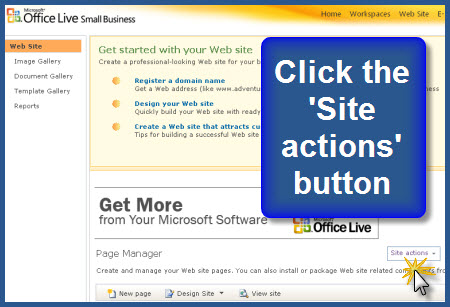
- Click "Activate Advanced Design Features" then click "OK" (NOTE: if you are already using the Advanced Design Features, you will see an option to "Deactivate Advanced Design Features". In this case, just skip this step.)
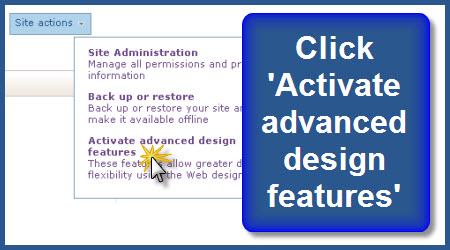

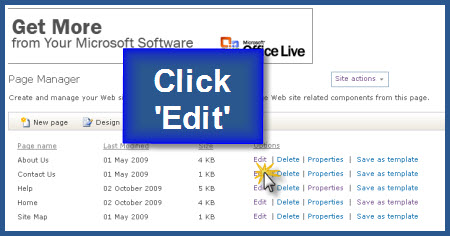
- Click "Edit" beside the web page to which you want to add StatCounter - this opens the Page Editor
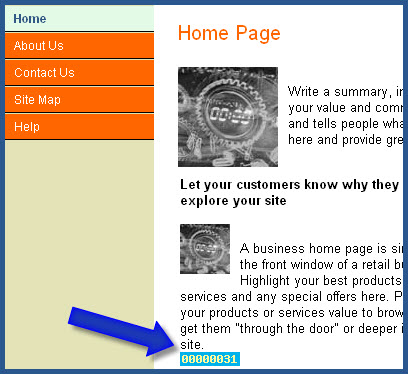
- Click "Module" and select "Custom Footer"

- Paste your StatCounter code into the window and click "OK"

- Click "Save" and that’s it!
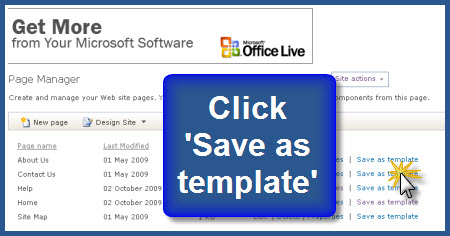
To save time, consider setting up a template with your StatCounter code installed and use your template as the basis for all new pages on your site. Here's how:
Install StatCounter on one of your website pages following the instructions above. Then click 'Save as template' beside your page in the Page Manager section. Your template will now be available to you every time you create a new page
Get Started
Sign up for a Statcounter account using our Microsoft Office Live installation guide.
Try it for FREE!Already a Member?
You can reinstall Microsoft Office Live on your Statcounter project.
Installation Guides A - Z
- Adobe Contribute
- Adobe Muse
- Adobe Pagemill 3.0
- Adobe Portfolio
- BBEdit
- Beep
- BigCommerce
- Blogger
- BluDomain
- Britnett
- BuilderAll
- Cargo Collective
- Carrd
- Chime CMS
- Cloudflare Zaraz
- ClubRunner
- ComfyPage
- Concrete CMS
- create.net (DoYourOwnSite)
- Default
- deviantART
- Dreamweaver
- DreamWidth
- Drupal
- Duda
- eBay
- Ecwid store
- Exposure.co
- Expression Web
- Facebook Instant Articles
- Format.com
- Frames
- Frontpage 2000
- Frontpage 2002
- Frontpage 97/Express
- GoDaddy
- Google Sites
- Google Sites (new)
- Google Tag Manager
- Homestead
- HoTMetaL Pro
- HubSpot
- IMCreator
- iWeb
- iWeb (alternative)
- Jimdo
- Joomla
- Magento
- Media Wiki
- Microsoft Office Live
- Microsoft Publisher
- Moodle
- MSN Groups
- MSN Spaces
- Multiply
- MyBoomerPlace
- Net Objects Fusion
- Netscape Composer
- NVU editor
- OJS 3.1 (Open Journal System) Install Guide
- Online Picture Proof
- OpenCart
- PBase
- Photodeck
- PhotoShelter
- Posterous
- Prestashop
- ProPhoto Blog
- Qufoto
- Rapidweaver
- React
- Register.com
- Sandvox
- Serif Webplus 10
- Shopify
- Showit
- SingSnap
- Site123
- SiteSkins
- SmugMug
- Sparkle
- squadhelp
- SquareSpace
- Tagged
- theimagefile
- Tripod
- Tumblr
- TypePad
- Typo3
- vBulletin
- Vistaprint
- Visual Page 2.0
- Volusion
- Webflow
- Webnode
- Webs
- webShaper Install Guide
- Website X5 Pro
- WebStarts
- Weebly
- Wikispaces
- Wix html5 version
- Wix Premium
- WordPress
- WordPress.com
- WordPress.org
- Xanga
- Xara
- Xenforo
- Yahoo! Online Store
- Yahoo Groups
- Yahoo! Site Builder
- Yahoo Small Business
- Yola
- Yuku
- Zencart
- Zenfolio
- Zine Studio